
When querying relational databases, there is an issue more baffling than a syntax error: the query finishes in milliseconds, no error code is raised, but the resulting table is completely empty.
This scenario frequently surfaces when searching for records in one table that do not have corresponding entries in another. Syntactically, the query is well-formed. Logically, the expected records exist in the base table. However, the output returns zero rows.
Reviewing the internal filtering process reveals that this outcome is directly driven by how the query engine evaluates conditions when encountering a NULL value.
1. A common use case: The NOT IN predicate
Consider two standard tables within a transactional system:
‘customers’: contains registered user profiles.
‘orders’: contains purchase transactions.
The objective is straightforward: identify customers who have never placed an order. A direct and readable approach is using the NOT IN operator:
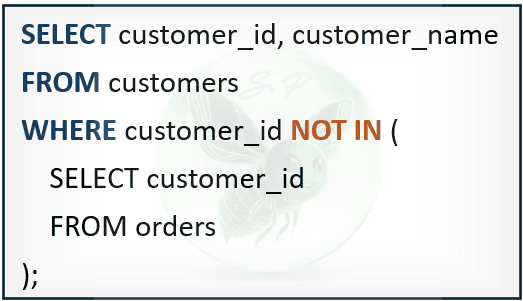
The intent is clear: retrieve customer profiles whose customer_id does not appear in the distinct set of IDs from the ‘orders’ table.
Upon execution, the system returns zero row.
A manual inspection of the ‘customers’ table confirms that dozens of new accounts were registered recently without any purchase activity. Why did the query eliminate all of them?
2. Understanding three-valued logic (3VL)
To locate the root cause, one must understand how relational database engines interpret NULL.
In standard spreadsheet applications, an empty cell is often treated as equivalent to zero or an empty string (""). In SQL, however, NULL is not a value; it is a marker indicating the absence of information (missing or unknown data).
Because NULL does not represent a definite value, standard comparison operators (=, <>, >, <) cannot yield a result of TRUE or FALSE. Instead, the result of such a comparison is always a third state: UNKNOWN
101 = NULL ➔ UNKNOWN
101 <> NULL ➔ UNKNOWN
NULL = NULL ➔ UNKNOWN
SQL evaluates boolean expressions using three-valued logic (3VL): TRUE, FALSE, and UNKNOWN
3. How NOT IN unrolls under the hood
When executing a NOT IN predicate, the database engine expands the statement into a chain of inequality comparisons joined by the AND operator.
Suppose the ‘orders’ table contains a single incomplete transaction record where customer_id was left unassigned (NULL), alongside valid records 101 and 102: The ID list is: (101, 102, NULL).
In this scenario, the filter condition is expanded as follows:

expands logically to:
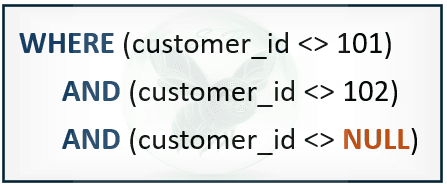
Consider the evaluation step-by-step:
Assume a new customer with customer_id = 200.
The expression (200 <> 101) evaluates to TRUE.
The expression (200 <> 102) evaluates to TRUE.
The final expression, (200 <> NULL), resolves to UNKNOWN.
According to boolean logic for the AND operator:

Because one component of the conjunction evaluates to UNKNOWN, the entire logical chain resolves to UNKNOWN
4. The operational rule of the WHERE clause
The database engine retains a record only if the filter condition evaluates strictly to TRUE. Any record evaluating to FALSE or UNKNOWN is discarded.
Because every candidate record evaluates to UNKNOWN in this scenario, the engine excludes the entire dataset from the output, returning zero row.
5. Robust query patterns for production
Understanding this mechanism allows data practitioners to handle exclusion logic reliably using two methods:
Explicitly Exclude NULLs from the Subquery
When keeping the NOT IN syntax, an explicit filter must be added to the subquery to ensure no missing values enter the comparison list:
Method 1: Explicitly exclude NULLs from the subquery
If you still prefer using NOT IN, it's best to add a safeguard (an explicit filter to the subquery) to ensure the returned list doesn't miss any values that satisfy the condition.
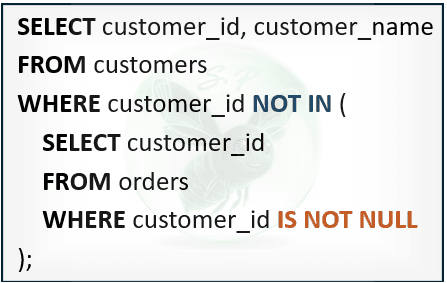
By filtering out NULLs from the subquery, the AND chain now evaluates strictly to TRUE or FALSE. This eliminates the 'UNKNOWN' trap and correctly returns the customers who haven't made a purchase
Method 2: Switch to using the NOT EXISTS clause
In production environments, NOT EXISTS is generally the preferred approach for handling set exclusion. It naturally bypasses the NULL issue and often yields better performance.
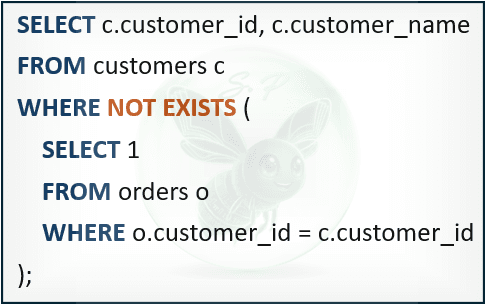
In an EXISTS clause, the database engine ignores the specific columns or values returned; it simply verifies whether at least one row satisfies the condition. Using SELECT 1 (or any constant value) within the subquery is a common coding practice to indicate that we only need to confirm the existence of a record, avoiding the overhead of loading additional column data into memory.
Unlike NOT IN, NOT EXISTS does not expand into a discrete value comparison list. It strictly checks for row existence (i.e., whether any row in the ‘orders’ table matches the current customer_id).
If no match exists, the predicate returns TRUE. This structure is completely unaffected by NULL values in the table referenced within the subquery.
Observing how the system handles NULL values reveals a core truth: in relational databases, missing data is not merely empty space on a report. It is a logical state capable of completely altering query results if not strictly controlled during filter design.
Comments
0 commentsLeave a comment
No comments yet. Start the conversation.