
One of the most confusing issues in reporting and analytics occurs when aggregated metrics multiply unexpectedly.
When calculating total sales directly from the primary orders table, the numbers match the financial records exactly. However, when joining an additional table to incorporate descriptive attributes, the reported revenue suddenly jumps, sometimes by 50%, or even doubling.
The database engine returns no error messages. Aggregate functions like SUM compute accurately according to their syntax. However, the final result deviates entirely from actual business figures.
In data engineering, this phenomenon is known as Row duplication, the consequence of viewing JOIN merely as an operation to append columns, rather than an algebraic operation that generates an entirely new dataset.
1. Mechanism difference: Procedural lookups vs. set-based operations
In spreadsheet tools such as Excel, combining data is typically associated with lookup functions like VLOOKUP or XLOOKUP.
The lookup mechanism operates procedurally row by row: it takes an identifier from the primary table, scans sequentially down the reference table, extracts the value from the first matching row, and stops. The total number of rows in the primary table does not change throughout this process.
Relational databases, however, do not operate by iterating through records row by row. SQL processes data using set-based operations, where transformations evaluate and manipulate entire sets of records at once.
When executing a join, the system is not simply pasting an additional column onto an existing table. Instead, it creates an entirely new dataset by combining the two sets according to the join condition
2. A real-world scenario: When aggregated metrics multiply
Consider a typical normalized schema in e-commerce:
The ‘orders’ table: Stores metadata at the overall order grain (one record per order, containing the order_id and the final settlement amount total_amount, which includes taxes, shipping fees, and order-level discounts).
The ‘order_items’ table: Stores line items within each order (one order can contain multiple product records, tracking attributes such as product_name and category).
A common business requirement arises: "Calculate the total revenue of orders that contain products from the Electronics category”.
To filter these orders, the category column must come from the ‘order_ items’ table. Meanwhile, the total_amount is stored in the ‘orders’ table.
A natural query to join the two tables would look like this:
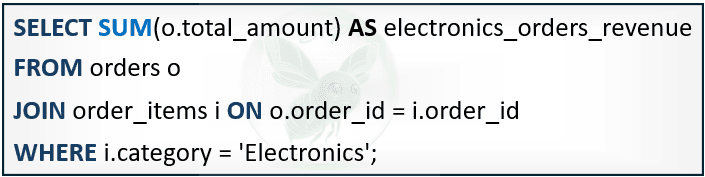
Suppose the database contains order 101 with a total_amount of $500. The customer purchased two items belonging to the Electronics category:
Record 1 in ‘order_ items’: Order 101, Item "Laptop", Category "Electronics"
Record 2 in ‘order_items’: Order 101, Item "Mouse", Category "Electronics"
Before SUM executes, the system joins the tables and applies the filter, producing the following result:
order_id | total_amount | product_name | category |
101 | 500 | Laptop | Electronics |
101 | 500 | Mouse | Electronics |
Because order 101 has two line items satisfying category = 'Electronics', the join produces two records.
📌 Note on join behavior:
This query uses an inner join (INNER JOIN, written simply as JOIN) rather than a LEFT JOIN. This behavior matches how SQL executes queries: using a LEFT JOIN followed by a filter condition like WHERE i.category = 'Electronics' filters out all NULL rows from the child table, turning the query into an inner join.
More importantly, this example demonstrates that row duplication is not limited to outer joins (OUTER JOIN). Even with a standard inner join, whenever the underlying relationship is one-to-many, the row count expands and distorts aggregate metrics.
When SUM(o.total_amount) executes, it does not calculate across the original orders table; instead, it runs directly on the intermediate result set generated after the join. Because the $500 value appears in both rows, the final sum becomes $1,000, double the actual order total.
Mathematically, if an order contains matching items, its total_amount is counted times in the result set. Across thousands of transactions with different numbers of items, the reported revenue multiplies and deviates significantly from actual financial records.
3. The core issue: The conflict in Data Grain
Row duplication highlights the mismatch between procedural thinking and set-based operations, which comes from the difference in data grain between the two tables:
The ‘orders’ table: Defined at the order grain (one row represents one order).
The ‘order_items’ table: Defined at the product grain (one row represents one line item within an order).
This mismatch becomes clear when comparing the two ways of thinking:
Procedural thinking: Rooted in spreadsheet habits, it treats ‘orders’ as a fixed primary list and views the join as a simple lookup step, scanning row by row to check product conditions under the assumption that the row count of the orders table stays the same.
Set-based thinking in SQL: Relational databases do not preserve the row count of an individual table. In SQL, a join combines two datasets to produce an entirely new dataset. Because the relationship between orders and products is one-to-many, the resulting dataset expands to the product level.
The conflict happens when applying procedural thinking: assuming the query merely filters orders, while SQL executes a set-based operation that drops the result to a more detailed grain: the product level.
As a result, aggregate functions like SUM(total_amount) do not calculate across the original orders table. Instead, they calculate directly on every row generated in the new result set, multiplying the order value multiple times.
4. Solutions for preserving data integrity
To prevent row duplication and control the grain of the result set, set-based thinking can be applied through two common ways:
Method 1: Use EXISTS to preserve the grain of the primary table
When the business requirement only needs to check whether an order contains a qualifying product, without extracting additional attributes from the child table, the EXISTS clause is the ideal approach:
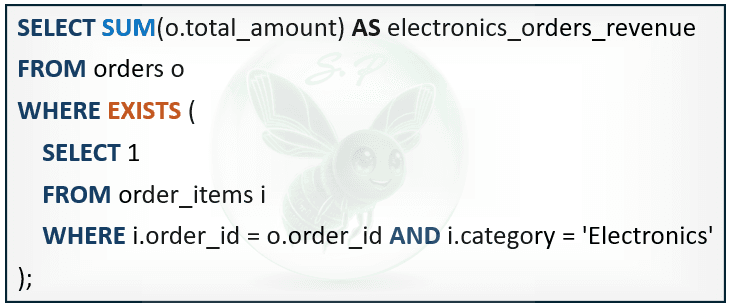
The EXISTS clause only checks for the presence of at least one matching record in the child table and stops for each order. This prevents multi-row joins on the ‘orders’ table, keeps the record count at the order level, and ensures that SUM accurately reflects the actual total amount.
Method 2: Aggregate the child table before joining (aggregate before join)
When a join is necessary to pull summary metrics from the child table, such as counting the number of electronic items alongside the order value, the solution is to reduce the grain of the child table to a one-to-one relationship before executing the join:
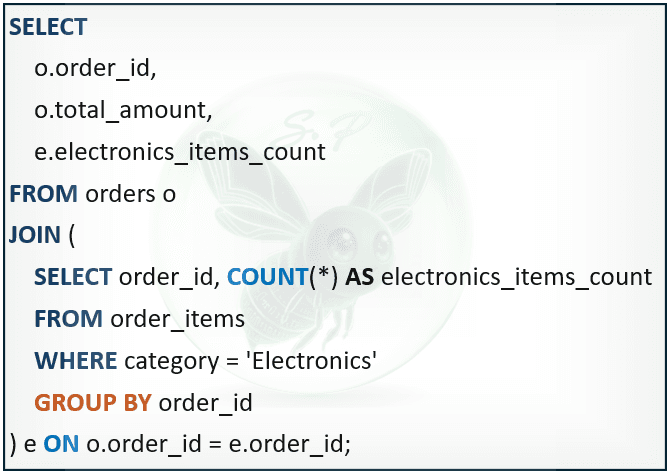
By aggregating the child table first in a subquery, each order_id appears only once. Both datasets are brought to the same grain before joining, preventing duplicate rows from skewing summary metrics.
Understanding the difference between procedural lookups and set-based operations is an essential step toward mastering SQL. Recognizing that a JOIN can change the data grain helps control row counts, preventing totals from multiplying in your reports.
Comments
0 commentsLeave a comment
No comments yet. Start the conversation.