
When many people think of SQL, they imagine a rigid programming environment: dark terminal screens, long blocks of code, and unforgiving syntax rules. This fear often becomes a barrier for professionals looking to step up their data game.
However, if you have ever used Power Query in Excel or Power BI to filter rows, remove unwanted columns, aggregate numbers, or merge two tables, the truth is: You are not starting from scratch.
The hardest part of working with data is never memorizing syntax like SELECT or WHERE. The real challenge lies in Data Manipulation Mental Models, the intuitive ability to know what fields to extract, what conditions to filter first, and how to aggregate data to answer a specific business question.
And that exact analytical mindset has been quietly cultivated by Power Query every single day.
1. A simple metaphor: Handcrafting vs. The Vending machine
To understand the connection between both tools, consider a simple beverage analogy:
Power Query is like handcrafting a drink at the counter: You grab a glass, squeeze an orange, drop in three ice cubes, and drizzle some honey. After each action, you visually watch the drink transform: the juice level rises, the ice floats. You control the process step-by-step. If you accidentally add too much honey, you simply step back and adjust it immediately.
SQL is like ordering from a smart dispensing machine: You do not guide the mechanical arms. Instead, you provide a precise "Specification Sheet": "Deliver a beverage made with fresh juice from 1 orange, 3 ice cubes, and 10ml of honey, served in a tall glass." The machine determines the most efficient way to prepare it and delivers the finished glass directly to you.
Both approaches yield the exact same refreshing drink with the exact same ingredients. The only difference is whether you execute the recipe step-by-step or declare the desired outcome in a single brief.
2. The "Rosetta Stone" between Power Query and SQL
Many table operations in Power Query have close counterparts in relational SQL. One tool visualizes these concepts through buttons on a ribbon, while the other declares them using structured English words.
The table below offers a simplified comparison of several common operations:
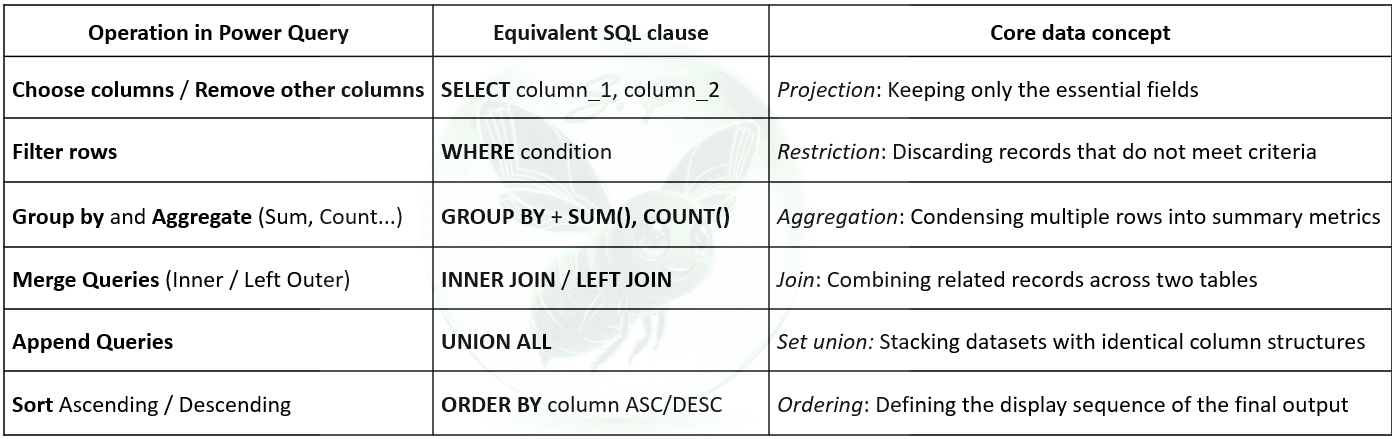
Whenever you build a workflow in Power Query, your clicks are guided by logic:
"This table has 20 columns, but I only need Order ID and Amount" ➔ That is the SELECT mindset.
"Only keep transactions that happened this year" ➔ That is the WHERE mindset.
"Group sales by customer to see who spent the most" ➔ That is the GROUP BY mindset.
In other words, you already have a useful foundation in analytical thinking. The next step is learning how to express those familiar operations as SQL statements.
3. Side-by-side: A real-world business scenario
Let’s look at a typical business request:
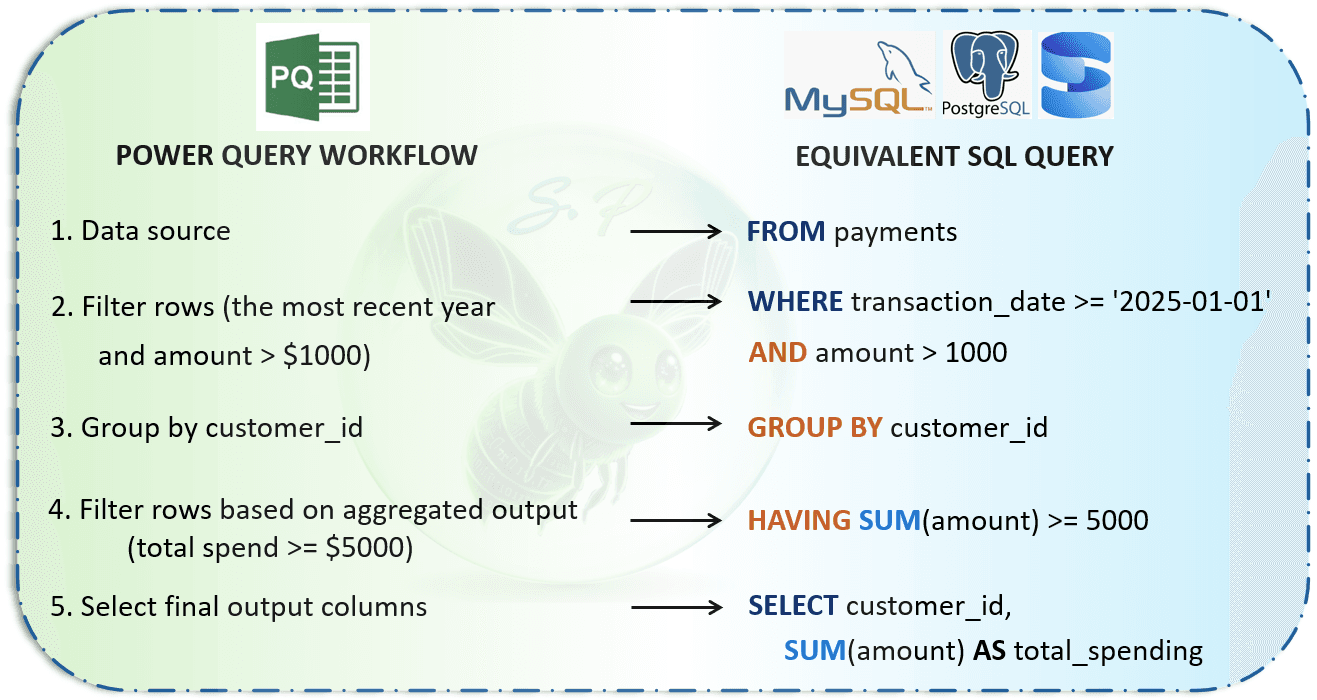
Scenario: From a massive transaction log, filter for purchases made in the past year with a transaction value exceeding $1,000. Next, calculate the total spend per customer and only retain VIP customers whose cumulative spend is at least $5,000.
Here is how both tools approach the exact same problem:
Now, look at the complete SQL query:
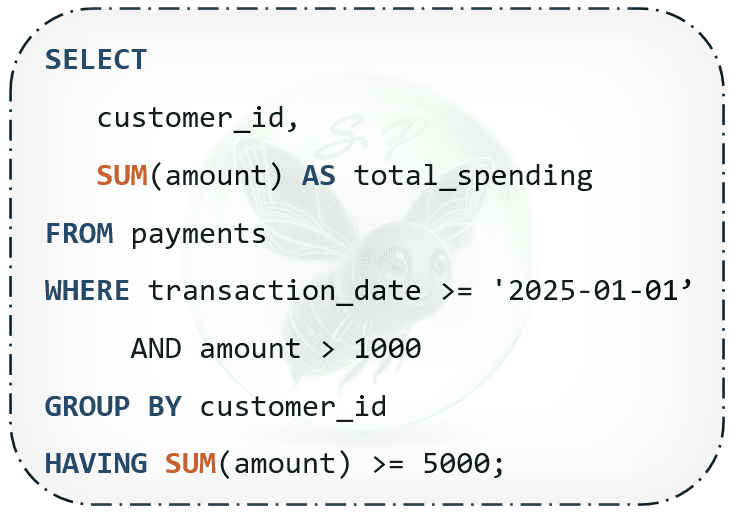
None of these lines are alien. Every single clause maps directly to the UI actions you already execute every day in Power Query:
FROM: Points to the underlying table.
WHERE: Represents the row-level Filter Rows steps on raw data.
GROUP BY: The familiar Group By dialog.
HAVING: The secondary filter applied after values are aggregated.
SELECT: Chooses which columns make it to the final view.
4. A natural bridge for data professionals
If you work with Power Query on a regular basis, take confidence in knowing that you already hold the most valuable asset: the ability to deconstruct a problem and structure data transformations.
SQL is not a foreign territory that forces you to reinvent your analytical instincts. It is simply a concise, declarative, and powerful way of expressing the exact same transformations you have already mastered on screen.
Next time you build a transformation in Power Query, pause for a second at each step and ask yourself: "If I were to describe this step in plain English clauses, what would it look like?". That simple habit is the fastest, most organic bridge to mastering SQL.
Comments
0 commentsLeave a comment
No comments yet. Start the conversation.